

📌 Module 7: People Analytics 📊
In this module, we’ll learn another key topic in Human Resources: People Analytics, a strategic tool that connects everything we’ve been covering—recruitment, training, performance—with data that will enable us to make better decisions.
People Analytics means converting everyday HR information into measurable data to be analyzed and compared, to improve the department’s performance, but especially to excel in our company objectives. In other words, we are going from intuitions to real indicators.
🧩What is People Analytics?
People Analytics is the process by which we collect, analyze, and interpret data about the people within our organization.
The goal is to gain a better understanding of the internal reality and make data-driven decisions.
From the beginning, our company has been generating data with our everyday actions, but we may not be aware of it. I will name a few examples, although you will see that you can find more:
- Employees files
- Attendance record
- Salaries and Worked Hours
- Climate surveys
- Performance evaluations
- Recruitment history
All of this, properly systematized, becomes an important source of information. However, to do that, we must first understand how to create the metrics to obtain standout data.
💡Why is People Analytics so important?
Let’s analyze some points that will help us understand the importance of People Analytics and how applying it in our company can be a benefit:
-
Improve recruitment and employee retention
- We can identify the recruitment channels that are most effective for the different positions in our company.
- We can measure the time it takes to fill vacancies and also the quality of hires. How well the new hire adapted to the role and the company culture.
- Identifying why employees quit our company. It will be essential to create a questionnaire for this purpose; we will try to understand the reasons employees are leaving our company. Later, with this data, we can train predictive models, which will bring us great benefits.
-
Optimize performance
Comparing metrics from different areas and roles will help us identify spots for improvement.
-
Increase the engagement and well-being
Analyzing work climate (work climate survey), workloads (Full Time Equivalent - FTE), and leadership practices.
-
Make decisions based on evidence
Now we will be able to support decision-making on concrete, measurable, and replicable data. That is why it is important to create robust metrics.
📌 Data types in People Analytics
Before we continue, it’s essential that we understand the types of data we can work with; this is how we will create metrics reliable for our analyses. Let’s get to it. 🙌
-
Qualitative data => Non-numerical data that describe characteristics or qualities. They are divided into two categories:
- Nominal: categories with no order or hierarchy (gender, area, marital status, etc.). For example, we can conduct a diversity analysis in our company.
- Ordinal: categories with an order or hierarchy (educational level, satisfaction, performance, etc.). It allows us to analyze, for example, our company based on the educational level attained by our employees.
-
Quantitative data => Data represented by numerical values. They are divided into two categories:
- Discrete: these are numerical values that result from counting (number of children, absences, courses completed). For example, counting the number of employees in our company who have children.
- Continuous: these are measurements, values that result from a measurement within a range (age, salary, hours worked). For example, when we want to group by age ranges or salaries.
- Additionally, we will be able to distinguish our data into the following two categories: structured data (data with a predefined and organized format, such as tables, spreadsheets, and databases) and unstructured data (data without a predefined format, such as free text, images, and videos).
🧩 Types of Analysis in People Analytics
When we develop our analysis, we’ll discover that we can analyze our company from four different perspectives. Let’s learn about them… 😉
- Descriptive analysis: We are conducting a descriptive analysis when we focus on what is happening in our company. We use historical data to identify patterns and trends. We can use it to introduce our overall analysis. For example, we can analyze the employee´s turnover rate over the past few years, show the average age of the staff, or the time it takes to fill vacancies.
- Diagnostic (exploratory) analysis: Explains why something happens. We dig into the data to identify the underlying causes of specific incidents. For example, if we notice an increase in employee turnover, we can analyze exit surveys, performance evaluations, and other data to understand the reasons behind this phenomenon.
- Predictive analytics: We will use historical data along with statistical models and machine learning algorithms to predict future events. For example, we can predict or expect when employees are most likely to resign in the coming months based on historical patterns. This is where machine learning models will be beneficial to us.
- Prescriptive analytics: Provides recommendations on what actions to take to achieve certain objectives. It uses data and models to suggest optimal strategies. For example, if we want to reduce employee turnover, prescriptive analytics can suggest specific interventions, such as professional development programs or improvements to the work environment. It is one of the most advanced and complex models; we will leverage AI and neural networks to achieve our objective.
🤔 How we can begin our analysis?
We already have an idea of the analyses we can conduct at our company. Still, to ensure a more robust analysis, we can utilize the international standard ISO 30414, which is designed to analyze people within organizations. This standard will help us structure our analysis and focus on the most relevant aspects.
📑 The role of ISO 30414 in People Analytics
As I mentioned earlier, ISO 30414 will enable us to conduct a much more structured analysis of people. Let’s analyze it in more depth… 🤓
- ISO 30414:2018 – This was the first version, and it focused on recommendations for metrics we could use to conduct our analyses.
- ISO 30414:2025 – This is the updated version, which introduces auditable metrics that will allow us to give greater weight to our results.
Is it mandatory to apply them? 🤔
👉 No, but it is recommended if we want the reports to be reliable, comparable, and professional.
🔎 Aspects covered by ISO 30414
The standard proposes metrics in the following categories:
- HR costs
- Diversity
- Leadership
- Productivity
- Safety and well-being
- Recruitment and mobility
- Skills and abilities
- Organizational culture
- Succession plans
- Compliance and ethics
- Staff availability
Each one provides indicators that allow for a more precise understanding of how people and the HR department work.
🛠️ Tools for working with People Analytics
We’ve learned what People Analytics is, the types of data and analyses we can use, and the ISO 30414 standard. Now it’s time to explore the software that will enable us to work with our analytics and present the results in dashboards that effectively highlight them. Let’s get to know them… 🙌
Among the most affordable and best for beginners:
- Excel => It allows us to organize data, create pivot tables, and basic charts.
- Power BI => Ideal for creating interactive dashboards and advanced visualizations. Additionally, it allows us to connect to multiple data sources, use DAX for complex calculations, and automate and transform data.
- Tableau => Excellent for visual analytics and handling large volumes of data. Similar to Power BI.
Then, if we want to take our analysis to deeper levels, we can work with:
- Python => It allows us to perform advanced statistical analyses and create predictive models.
- SQL => Ideal for managing and querying large databases.
Except for SQL, with all the others we’ll be able to create dashboards, visualizations, and reports. The important thing is that we must choose the tool that suits our work and the size of our company.
📅 Stages of the People Analytics Process
We’re almost ready to begin our People Analytics analysis; let’s review a few guiding points that will help us conduct a successful study.
-
First, we must define the objective of our analysis: what we want to demonstrate with it.
The objective will shape the type of analysis we conduct, the data we need, and the source that will provide the data for our study.
-
Having established the objective and the type of analysis, let’s select the program we’ll use to process the data.
Keep in mind that when you start working with the data, we must apply a data cleaning process, in which we ensure that the data type we’re working with is correct (some data types are text, integer, floating-point or decimal, date, Boolean, and more).
Ensuring the correct data type prevents processing errors when working with the data.
To facilitate processing, it is recommended to identify the data needed for our analysis and discard any data that won’t be used. 🚨 And advice: don’t forget to back up your data.
-
Now that our base is clean, we can begin analyzing the data.
The programs will enable us to work with formulas, allowing us to make even better use of the data we are working with.
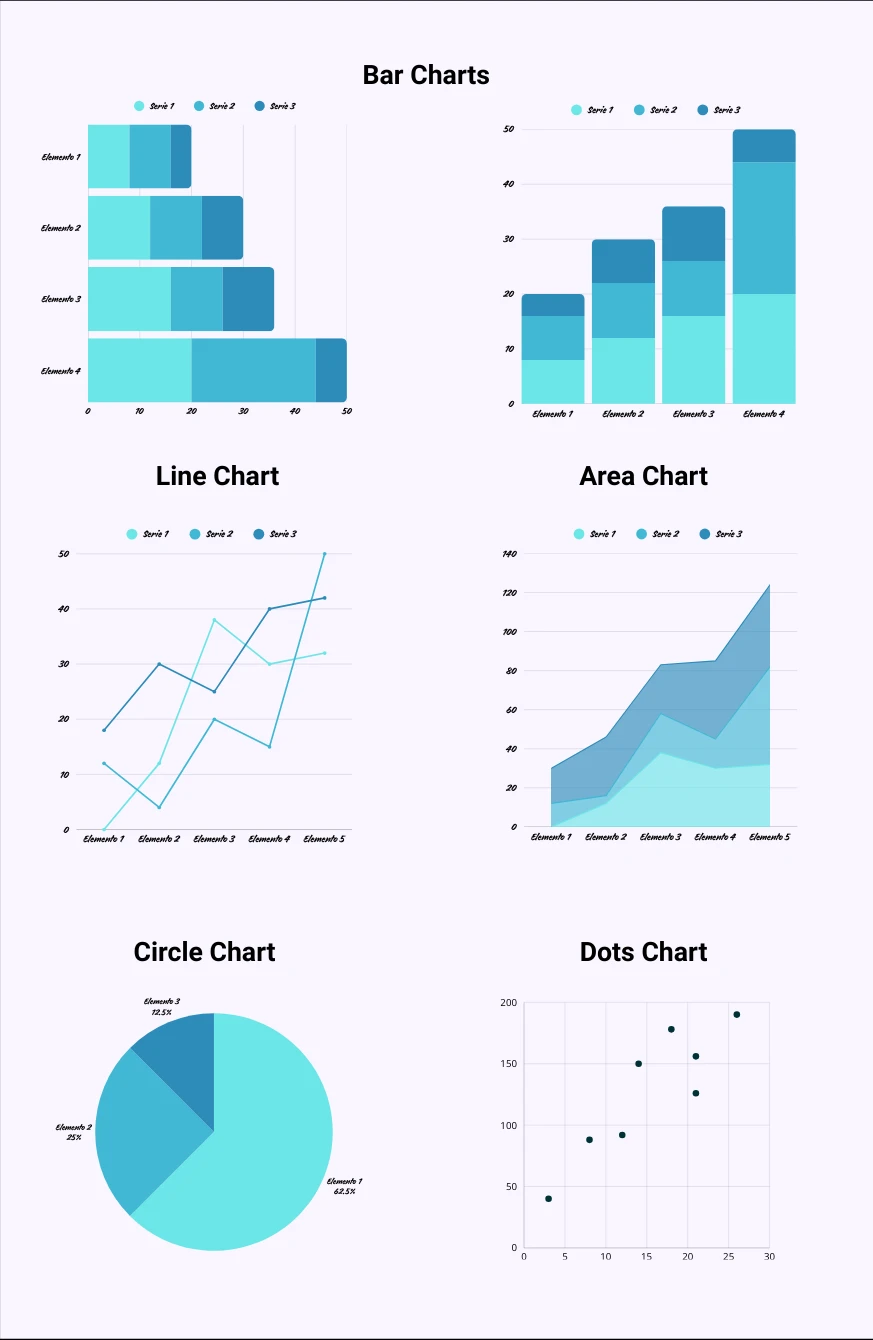
We will need to choose the visualizations that best represent the desired results. Charts can be pie charts, horizontal or vertical bar charts, tables, and more.
-
Now that we have the visualizations, we will proceed to create the dashboard to present the results of our analysis.
👉 TIP: Before the presentation, you can ask a colleague to review the dashboard to see if what you’re trying to convey is clear.
-
Now, after the latest revisions, we’re ready to present our analysis. 💪
😇 Best practices in data management
To wrap up, I’d like to share a few points to keep in mind when working with People Analytics.
-
Ensure the consistency and protection of the data.
-
Ensure transparency in reporting.
-
Limit access only to those who need it.
-
Align the analysis with the company’s strategic objectives.
-
Develop reporting protocols (generally annual).
-
Maintain metrics that are valid, auditable, and reliable.
🪄 Real-life examples
Let's see how we can conduct our people analytics by viewing a couple of examples.
-
📝Example 1: High turnover in one area
-
Data used: age, seniority, work climate, performance, leadership.
-
Result: the resignation was associated with excessive workloads and poor leadership.
-
Action: redistribution of tasks + training for middle management.
-
-
📝Example 2: Recruitment optimization
-
Coverage time and the origin of successful candidates are analyzed.
-
It has been found that LinkedIn generates 70% of good hires.
-
Action: stop investing in other portals that aren´t so effective.
-
-
📝Example 3: Prediction of resignations
-
A model that analyzes 20 indicators is trained.
-
Employees at risk are identified.
-
Action: preventive interviews, adjustments to conditions and workload.
-
👇 Additionally, I provide you with an example of how to calculate the FTE (Full-Time Equivalent).
🔐 Conclusion
People Analytics provides us with an objective, human snapshot of the company. It enables us to understand how our employees are performing, anticipate problems, make better decisions, and communicate results both internally and to investors or shareholders.
📌 It is a tool that professionalizes the HR department and aligns it with business strategy.
🧠 Practical exercises
👉 Exercise 1: Create a basic descriptive panel
- Gather real data about your company (or make it up): age, seniority, area, and gender.
- Create a simple dashboard with three descriptive visualizations.
- Draw 5 conclusions.
👉 Exercise 2: Identify a problem and an appropriate analysis
- Choose a real problem: turnover, absenteeism, delays in recruitment.
- Decide what type of analysis to use (descriptive, diagnostic, predictive, or prescriptive).
- Indicate what data you will need.
👉 Exercise 3: Create a simple metric
- Select an indicator (e.g., turnover, average seniority, training cost).
- Write it down using a clear formula.
- Explain why it is important for your company.
🪄 Extra
To finish, here's a little bonus from a People Analytics analysis I did as an exercise with a database of Kaggle. The database used was as follows:
- User: PAVANSUBHASH
- Title: IBM HR Analytics Employee Attrition & Performance
- Link: Go to the dataset
It is an analysis in which I used ISO 30414:2018 and to work with the database I used Python, Excel, and Power BI.
Here is the link to see the full analysis: Go to the analysis
🚨 I encourage you to experiment for yourselves with the Kaggle database. 😉💪